Requirements:
- Allows caller to enter 5 digit Zip Code. Enforce digit length.
- Allows caller to enter 3 digit Area Code. Enforce digit length.
- Captured digits are converted to variables, played back then end call.
- Allow one retry if invalid, play error and end call.

1.
Since we need a way to allow caller two attempts to enter a valid zip code and area code, we need to keep track of how many times they have been through the flow. The initial call will use a Set Variable step and set loopCount to 0.
Then if there is an error, the call will get looped back to the Condition step with loopCount incremented by one.
Once loopCount is <= 1, it will breakout and end the call.

2.
3.
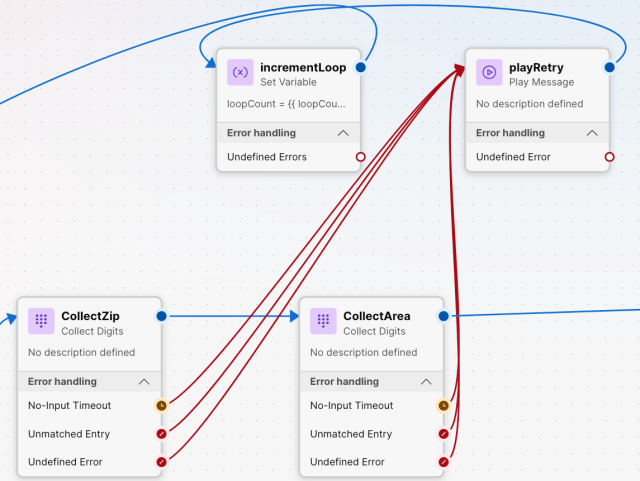
The digit length enforcement happens in the Collect Digits step by setting the Max and Min digits. If not met it will break out to the Play Message step, then the Set Variable step will increment loopCount by one and finally back to the Condition step to try again. ( {{ loopCount + 1 }} )
5.
Once the caller enters valid digits, they will be stored in the DigitsEntered variable. Each step will have a unique variable step_name+DigitsEntered

To transfer the values to a different variable for later use the Set Variable step and then reference the new variable name.

e.g. The zip code you entered was {{ZIP}} and the area code you entered was {{AC}}


IMPORTANT CONCEPT Output variables direct from the actions like CollectArea.DigitsEntered can not be displayed directly to an agent. You must use a Set Variable step to convert the output variable to a local/flow variable then it becomes a option to share direct to the agent.